

Free Travel itenary
Whether you’re planning a weekend getaway, an international holiday, or a business trip, keeping all your travel details in one place can make your journey much less stressful. That’s where a free travel itinerary template becomes useful. Instead of managing multiple emails, booking confirmations, and handwritten notes, you can organise your flights, accommodation, daily activities, transportation, and emergency contacts in a single document.
Today, you don’t need to create an itinerary from scratch. Many websites offer professionally designed templates that you can customise to suit your travel plans. If you prefer a simple document, you can use a travel itinerary template Word file in Microsoft Word. If you want something more visual, platforms like Canva and Adobe Express provide editable templates with modern layouts, while Microsoft Create offers free templates that can be opened directly in Word.
A travel itinerary is also useful beyond personal planning. Many travellers prepare one when applying for visas, sharing trip details with family members, organising group tours, or planning business travel. Having a clear itinerary helps you keep important information together and makes it easier to update your plans if your schedule changes.
In this guide, you’ll learn what a travel itinerary template is, why it is useful, what information it should include, how to create one in Microsoft Word, where to download reliable free and premium templates, and how to choose the best option for your next trip. We’ll also introduce a free Visa2Visit Travel Itinerary Template later in this guide that you can download and customise for your own travels.
Why Should You Use a Free Travel Itinerary Template?
Travelling involves much more than booking a flight. You’ll likely have hotel reservations, transportation schedules, attraction tickets, restaurant bookings, travel insurance documents, and emergency contact information to manage. A free travel itinerary template helps bring all these details together in one organised document, reducing the chances of forgetting something important.
Save Time Planning Your Trip
Creating an itinerary from a blank document can take hours. A ready-made template already includes the sections most travellers need, so you simply replace the sample information with your own travel details.
Whether you’re travelling alone, with family, or for work, using a template allows you to focus more on your trip and less on formatting documents.
Keep All Travel Information in One Place
Instead of searching through confirmation emails or multiple travel apps, your itinerary can include:
- Flight numbers and departure times.
- Hotel names and addresses.
- Check-in and check-out dates.
- Daily sightseeing plans.
- Restaurant reservations.
- Airport transfer details.
- Emergency contact numbers.
Having everything in one document makes your trip much easier to manage.
Helpful for Visa Applications
Many embassies and consulates request a travel itinerary as part of a visa application. A well-organised itinerary clearly shows your intended travel dates, accommodation, planned destinations, and return arrangements.
Although visa requirements vary by country, preparing a detailed itinerary can help support your application and demonstrate your planned travel schedule.
Easy to Share
If you’re travelling with family, friends, or colleagues, sharing one itinerary ensures everyone has access to the same information.
You can:
- Email it as a PDF.
- Print copies before departure.
- Save it on your phone.
- Store it in cloud services for easy access.
This reduces confusion and helps everyone stay informed about the travel schedule.
Works Well in Microsoft Word
Many travellers specifically search for a travel itinerary template Word because Microsoft Word is familiar and easy to use.
Word templates allow you to:
- Edit text quickly.
- Add or remove itinerary sections.
- Insert tables and images.
- Print professional-looking documents.
- Save your itinerary as a PDF for sharing.
Microsoft also provides a collection of free templates through its template library, making it easy to customise documents without advanced design skills.
Choose Between Free and Premium Templates
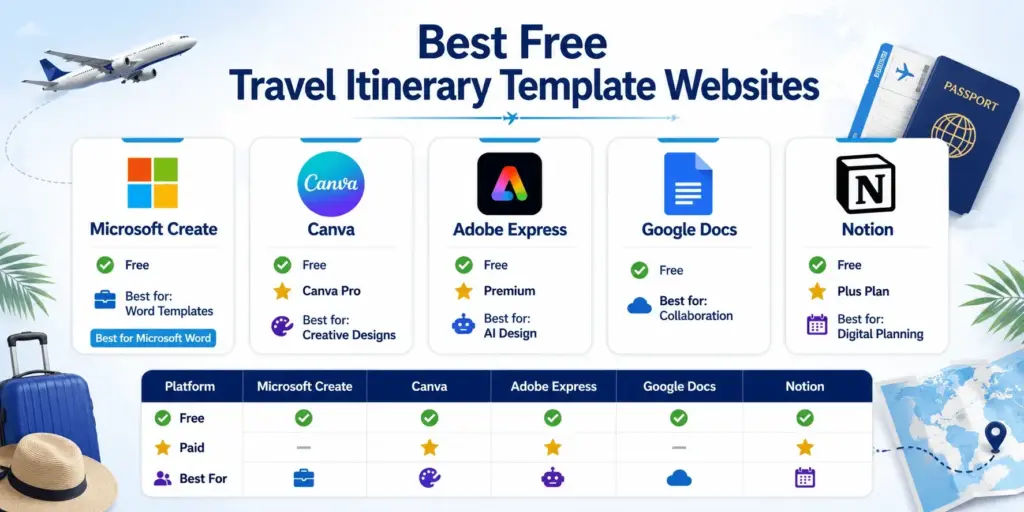
Free Travel itenary Compare
There are plenty of free options available for most travellers. However, if you want more advanced designs or branding features, several platforms offer premium templates as well.
Some of the most popular options include:
- Microsoft Create – Best for editable Microsoft Word templates.
- Canva – Ideal for beautifully designed travel planners with both free and Pro templates.
- Adobe Express – Offers hundreds of free and premium itinerary templates with drag-and-drop editing and AI-powered design tools.
Choosing the right template depends on your travel style. A simple Word document may be perfect for a business trip, while a colourful Canva design might be better suited for a family holiday or honeymoon itinerary.
By starting with a reliable template, you’ll spend less time organising documents and more time enjoying your journey.
What Should Every Travel Itinerary Template Include?
A well-designed free travel itinerary template should do more than list your travel dates. It should help you organise every stage of your trip, from departure to your return home. Whether you’re planning a holiday, business trip, honeymoon, or group tour, including the right information will make your itinerary far more useful.
Below are the essential sections every itinerary should contain.
Trip Overview
Start with the basic information about your journey. This provides a quick summary that you can review at a glance.
Include:
- Traveller name(s)
- Destination(s)
- Departure and return dates
- Purpose of travel
- Passport number (optional)
- Emergency contact details
This section is especially useful when travelling internationally or sharing your itinerary with family members.
Transportation Details
Keep all transportation information together so you don’t need to search through multiple confirmation emails.
Record details such as:
- Airline name
- Flight numbers
- Departure and arrival times
- Airport terminals
- Train or bus schedules
- Car rental information
- Airport transfer details
Having these details in one place helps reduce stress, especially during busy travel days.
Accommodation Information
Add complete accommodation details for every destination.
Include:
- Hotel or property name
- Address
- Contact number
- Check-in date
- Check-out date
- Booking reference
Keeping these details readily available makes check-in quicker and helps if you need directions or assistance.
Daily Schedule
A day-by-day itinerary helps you make the most of your trip without overplanning.
You can divide each day into:
- Morning activities
- Afternoon sightseeing
- Evening plans
- Meal reservations
- Free time
A flexible schedule also gives you room for unexpected discoveries or changes in your plans.
Budget Tracker
Tracking expenses helps you stay within your travel budget.
Common categories include:
- Flights
- Accommodation
- Local transportation
- Food and drinks
- Attractions
- Shopping
- Emergency expenses
Including a simple budget section in your travel itinerary template Word document makes it easier to monitor your spending throughout the trip.
Emergency Information
Always reserve space for important emergency details.
This section should include:
- Travel insurance provider
- Policy number
- Embassy or consulate contact information
- Local emergency telephone numbers
- Family emergency contacts
Having this information readily available can save valuable time during unexpected situations.
How Do You Create a Travel Itinerary Template in Microsoft Word?
If you prefer a document that’s easy to edit and print, a travel itinerary template Word file is an excellent choice. Microsoft Word provides flexible formatting tools that let you build your own itinerary or customise one of Microsoft’s ready-made templates. Once you’ve finished editing, you can save the document as a Word file or export it as a PDF for easy sharing.
Step 1: Start with a Blank Document or Template
Open Microsoft Word and create a new document.
You can either:
- Start with a blank page.
- Search Microsoft’s template gallery for a suitable layout.
- Download a template and customise it for your trip.
Using a template saves time because much of the formatting is already completed.
Step 2: Create Clear Headings
Divide your itinerary into organised sections, such as:
- Trip Overview
- Flights
- Accommodation
- Daily Schedule
- Budget
- Emergency Contacts
Clear headings make the document easier to navigate while travelling.
Step 3: Insert Tables
Tables help organise information neatly.
For example, you could create a table with columns for:
- Date
- Time
- Activity
- Location
- Notes
This layout makes it much easier to follow your travel schedule than using long paragraphs.
Step 4: Personalise Your Itinerary
Now replace the sample content with your own travel details.
You can also:
- Add destination photos.
- Insert maps or QR codes.
- Include booking reference numbers.
- Highlight important reminders.
- Add your travel checklist.
Microsoft Word allows you to customise fonts, colours, icons, and layouts without requiring advanced design skills.
Step 5: Save and Share
Once you’ve finished, save your itinerary in multiple formats.
Recommended formats include:
- DOCX for future editing.
- PDF for printing or sharing.
- Cloud storage for access from any device.
Keeping both digital and printed copies ensures you’ll still have access to your itinerary even if your phone loses battery or internet access during your trip.
Common Mistakes to Avoid When Creating a Travel Itinerary
A well-planned itinerary can make your trip more enjoyable, but small mistakes can lead to unnecessary stress. Whether you’re using a free travel itinerary template or creating your own travel itinerary template Word document, avoid these common errors.
Trying to Do Too Much in One Day
Many travellers pack too many activities into a single day. This often leaves little time to relax or deal with unexpected delays. Leave some flexibility in your schedule so you can enjoy each destination without rushing.
Forgetting Important Booking Details
Always include:
- Flight numbers
- Hotel booking references
- Check-in and check-out times
- Transportation confirmations
- Attraction tickets
Keeping these details together saves time when travelling.
Ignoring Emergency Information
Your itinerary should include:
- Travel insurance details
- Emergency contact numbers
- Embassy or consulate information
- A family contact back home
Having this information readily available can be invaluable if an emergency arises.
Not Keeping Backup Copies
Store your itinerary in multiple places:
- Printed copy
- Mobile phone
- Cloud storage
- Email attachment
This ensures you can still access your plans even if your device is lost or has no internet connection.
Forgetting to Update Your Itinerary
Travel plans often change. Whenever your flight, hotel, or activities are updated, revise your itinerary so you’re always working from the latest version.
A free travel itinerary template is one of the easiest ways to organise your travel plans, whether you’re preparing for a family holiday, business trip, honeymoon, or international adventure. Instead of keeping important information across multiple emails and booking confirmations, a well-designed itinerary brings everything together in one place.
If you prefer a simple, editable document, a travel itinerary template Word is an excellent option because it’s easy to customise, print, and save as a PDF. For travellers looking for more creative designs, platforms such as Microsoft Create, Canva, and Adobe Express provide a wide range of free and premium templates to suit different travel styles. Microsoft offers downloadable templates through its Office apps and Microsoft Create, while Adobe Express provides hundreds of editable itinerary templates that can be customised online.
To make planning even easier, we launched the Visa2Visit Travel Itinerary Template, a free downloadable template designed specifically for international travellers and visa applicants. It will include sections for flights, accommodation, daily schedules, budgets, emergency contacts, and other essential travel information, helping you stay organised from departure to your return home.
Whether you’re planning your first trip or your fiftieth, investing a few minutes in creating a detailed itinerary can save time, reduce stress, and help you enjoy every stage of your journey with confidence.
Free Travel Itinerary Template download here
Word Format – Visa2Visit-Ultimate-Travel-Planner
PDF Format – Visa2Visit-Ultimate-Travel-Planner
Leave a Reply